Faceted Navigation
Martijn van Welie
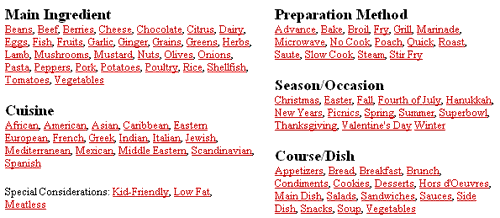
From www.epicurious.com
The users are searching for an item in a structure where all facets of an item are a possible entry point
The users must select an item out of a large set of items. Normally, the items are structured hierarchically but when the structure uses an organization by category and the categorizations become to 'arbitrarily' or 'debatable', it may be better not to choose for a fixed organization. Instead, a more flexible and dynamic organization scheme can be chosen so that the users can determine which categorizations work for them rather than the designers deciding which one the users MUST use. Faceted Navigation can also be seen as an alternative for where users can 'search' on the information 'facets' rather than seen the facet come back in the 'normal' navigation.
For Faceted Navigation to work, all items in the information space must share the same facets. For example, it will theoretically work well for 'collections' of things like recipes, flights, cars, hotels, CD's, books and so on. However, if the collection has a traditional categorization that users will expect, Faceted Navigation may not be the best choice. If your site has a lot of 'double-bound' items (items that appear in more than one category), you may have to consider Faceted Navigation.
Allow the users to navigation the information space by progressively selecting desired facets of the information items.
The idea is to navigate by 'facets'. So in the first step users can select a facet out of the set of all facets. In the next step, the users can select another facet out of the remaining facets. Which facets users will see as available navigation choices is dependent on the path they take.

In terms of navigation, there are two options for realizing a Faceted Navigation:
- Using a variation of . In each step the number of categories is reduced by one. The Epicurious example uses this variation.
- A variaton of . Instead of entering a keyword, the users set the characteristics and get the results matching the characteristics. The Kohler uses this variation.
For both variations it is important that the users see how a selecting leads to fewer results. Therefore, the minimum feedback is the number of results that match the current selections. Even better is to show the results directly so that users can select them if they see what they like.
Instead of forcing one way to view the items, Faceted Navigation allow users to view the items in any way they want. At the same time they learn how the items are structured so that they may consider other search strategies in the future.
After choosing to browse firstly by the ingredient "Pork" users are immediately presented with matching recipes and they have the option to refine by several dimensions.

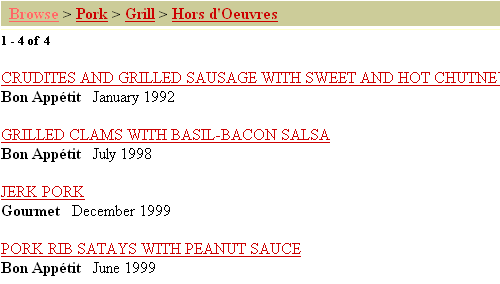
After choosing for a "grill" recipe and a "hors d'ouvre" user get to the lowest level:
At www.kohler.com users can search for faucets. The they offer is actually a type of faceted navigation. As you select the value from a combobox the possible values of the other comboboxes are being updated.
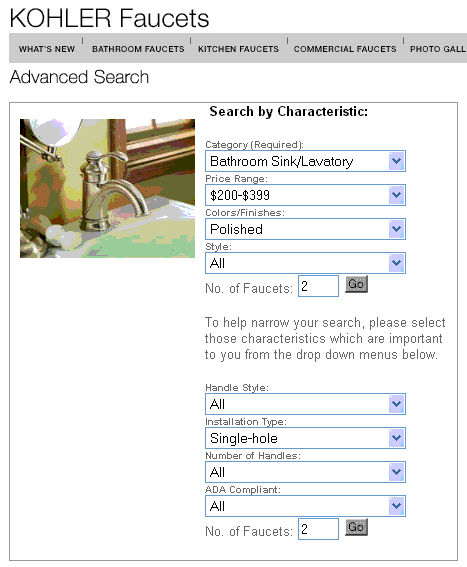
Unfortunately, Kohler does not shown the results are users set characteristic. They must select the 'go' button after which they see the this screen:

Also notice the possibility to select products for a or a list of
www.epicurious.com;
www.yahoo.com;
www.kohler.com