View
Martijn van Welie
Users need to manage a collection of objects
Typically used in a in which 'Views' are the main elements. Users need to manage objects such as emails, bank accounts, stocks, orders and so on.
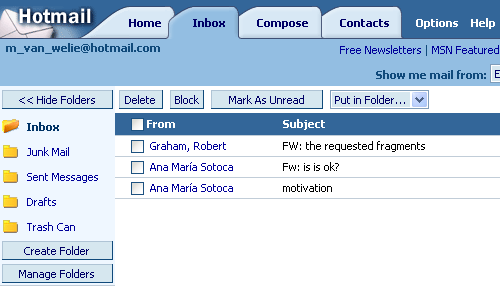
From
www.hotmail.com
Create an overview of objects that together is meaningful to users
A view usually is an overview of a set of objects, e.g. email messages, orders, appointments, products, image, . When views are editable, they may take the form of a or a list of thumbnails or a custom-designed overview. Views usually contain 'abbreviated' description of the objects themselves. These descriptions are usually clickable which results in a detailed view of the object. Closing the detailed view takes users back to the view itself. Views are typically placed in the of the page. When views are very large, some form of or can be used. Switching from one view to another is done using the .
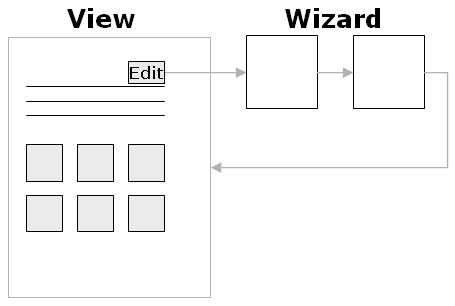
Typical behavior with forms consists of 'view-edit-return'. The user selects an item in the view and edits the detailed description using a and/or a . Once the editing is completed, the users is presented with the view again.
A view is sort of a 'safe place' from which all kinds of 'management' functionality can be used. It gives users the overview they need and it is obvious how users can access the management functionality.
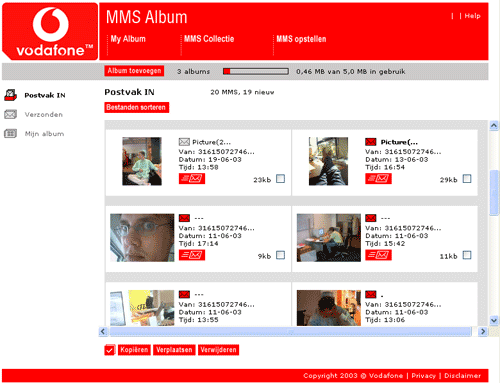
At www.vodafone.nl can manage a collection of MMS-es. An overview is given from which users can 'copy', 'move', 'view', or 'delete' MMS-es.