Trail Menu
Martijn van Welie
User need to find information in a hierarchical structure.
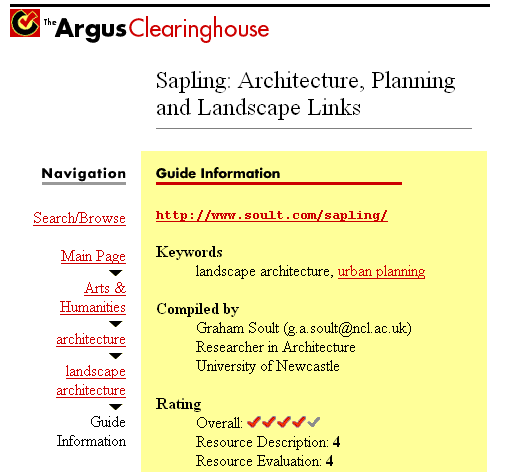
From www.clearinghouse.net/
The site has a shallow structure, typically up to 5 or 6 levels, while the number of items on each level are numerous.
Show the traversed path in the menu
This leads to a kind of but then integrated with the menu itself. The path can be shown horizontal or vertical. Each item of the path is a link that takes users back to that level.
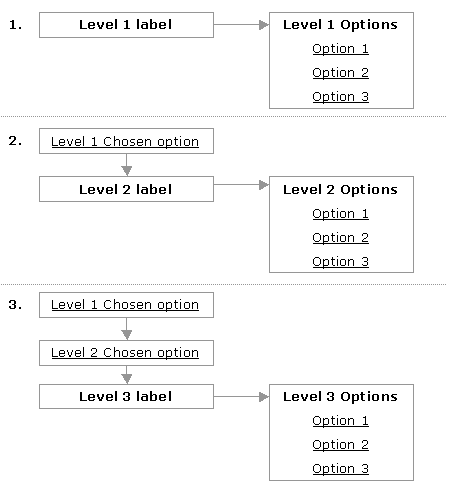 This type of navigation is a mix between a breadcrumb and menus. It consumes very little space and allows for the display of many items on a particular level.
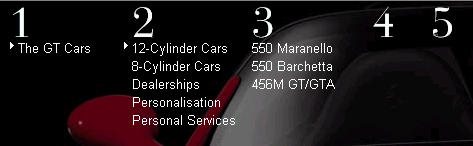
The Ferrari site uses a horizontal variant that keeps the last two levels in sight.
This type of navigation is a mix between a breadcrumb and menus. It consumes very little space and allows for the display of many items on a particular level.
The Ferrari site uses a horizontal variant that keeps the last two levels in sight.
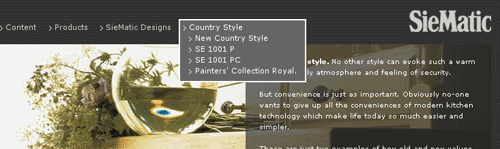
Here is another horizontal example from Siematic, a true combination of a and .
 www.ferrari.com
; www.argus.com
www.ferrari.com
; www.argus.com