Sorting
Martijn van Welie
The users need to sort a list of items manually

From www.yahoo.com/
The users are faced with a list of items. It may have been generated but they could also have built it themselves, for example using a . Now they need to sort the items based on personal judgement. Users want to see the current order at all time.
Allow the users to select one or more items and to move them to the new location.
Present the list together with up and down buttons. By selecting an item and pressing the up or down button, the item can be moved. Effectively it swaps its place with the item above or below it when it is moved. By selecting several items, users can move a small set of items to a new place. In addition, buttons for the top or the bottom of the list could be used to more items to those special positions.
Moving items can also be done by dragging and dropping. In this case, an item is selected and dragged to the new position.
The users are presented with the entire list in the current order. By moving items they immediately see the new order of items. Repeated selection and moving leads to a sorted list.
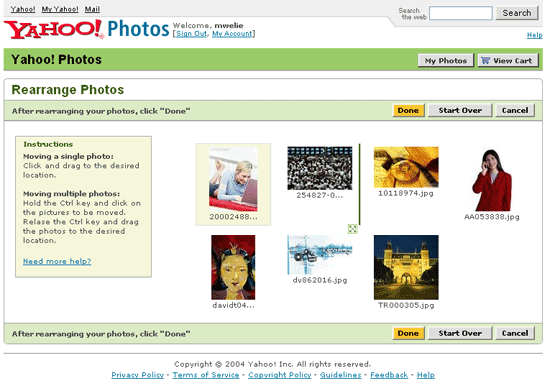 www.yahoo.com;
This pattern can be used together with other list related patterns such as the List Builder pattern.
www.yahoo.com;
This pattern can be used together with other list related patterns such as the List Builder pattern.