Font Enlarger

Problem

Users want to view the page in a larger font size

Solution

Allow users to increase/decrease the font size of the text using special controls in the page.
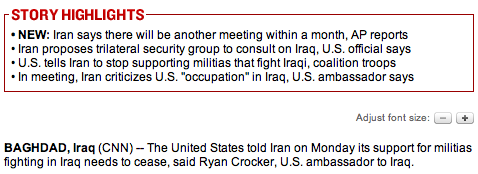
From www.cnn.com


Use when

The users are viewing pages with a lot of prose-like content that they must read. For example on a Article Page. Especially users with reduced eyesight will often find that the default font size is to small for them to read the text comfortably.

How

Provide font size controls next to the text. Either show controls for a specific font size or show controls to increase or decrease the font size.

Why

Although many browsers also support the enlargement of fonts via the View menu and keyboard shortcuts, many people don't know how to use the feature. Having a special control on the page, near the text is a more direct way of doing the same thing.

More Examples

At www.iht.com users can zoom in or out:
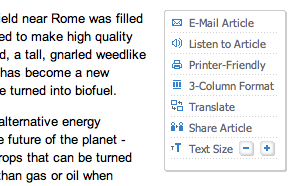
http://www.tedco.org/ http://www.harper-adams.ac.uk/accessibility/ http://www.airnorth.com.au www.dell.com

Code examples

Font resizing
JS font resizing
plml logo

Comments

2 comments have been added to this pattern


Greg Fields, 4th November 2007
This pattern may need to be updated. The target users for this pattern are primarily those with vision loss or a vision impairment who are not able to read the content effectively due to the text size. For this user type, the enlarged text javascript controls do not help as the control size is as small as the content text ... if not smaller. Further, the image, metadata for the image and the control are not placed in context. This causes screen reader applications used by this target user to provide user actions out of context and almost always increases frequency of error.

A more appropriate facilitation is to leverage relative text sizes for body content and afford users the opportunity to use the User Agent functionality of the market's top browsers that enable text resizing.

For the user with low vision, interaction with a browser-based User Agent is a known procedure that should be leveraged wherever applicable.
Santi Banks, 15th December 2008
The idea of enlarging content with javascript is not a bad idea at all but 99% of the time poorly executed.
The buttons used are usually too small. If someone needs help because the content is presented too small to see, then the buttons are hard to see too. So having large buttons to control the size of the content makes a lot of sense but funny enough, the enlargement buttons are usually smaller then the avarage menu item on a random website. Makes the execution "broken" in my opinion.

Also, people who have problems with reading stuff on the internet usually have set larger font sizes manually already because most websites use 10 or 11 pt textsize.

Sadly, most websites use hard values for textsize instead of em's or (even better) percentages which ignore the font size settings from browsers.
And as most websites don't use full liquid layouts, when sizing the content, some elements become unreadable because content dissapears in divisions with no good pagination system or overflow enabling.

On the positive side, some browsers now enlarge the whole site instead of just the text. Firefox 3 for example also renders the images and layout bigger, not just the text which is a real plus.


Add a comment
Do you have something to add or say about this pattern? Perhaps some more examples of how this pattern is used in the wild? Add a comment to this pattern and I'll update the pattern when necessary. Please abstain from misuse. I reserve the right to delete or modify inappropriate postings.

Your Name

Comment

Enter the verification code you see in the image below
captcha