Search Results
Martijn van Welie
Users need to process a list of search results
Users have done some for of search, e.g. using a or or . Now the users need to process the result, most likely by choosing one or more items for further investigation i.e. seeing the page, adding the item to a , collect items for a .
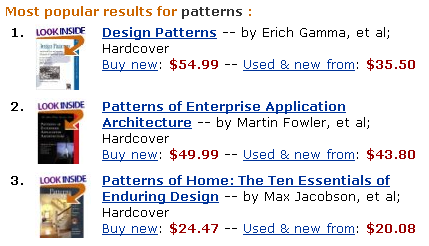
From
www.amazon.com
Present sorted results with a short description
Users are presented with a numbered list of results, sorted by relevance and starting with the most relevant result. Quite often, the number of results is too high to make all results fit on a page. Therefore results are shown in batches of 10 to 20 results using a mechanism. Users will generally only look at the first two pages of results and then refine their query if they didn't find what they wanted.
Displaying results. Ideally, the object itself is shown as the result along with a short description. This is possible when users search for objects like books, cars, mobile phones and so on. See the example of Amazon below. When users searched for a page within the site, the title of the page is the best thing to show. Other elements of a description include a summary, location, category, author etc. Which description elements are most appropriate depends on the particular site you are building. Nonetheless, descriptions should be short (e.g. 3 lines) and to the point. You may also "type" results by indicating the type in words or using icons. Also provide a link "more like this..." to find similar results (if your search engine supports this)
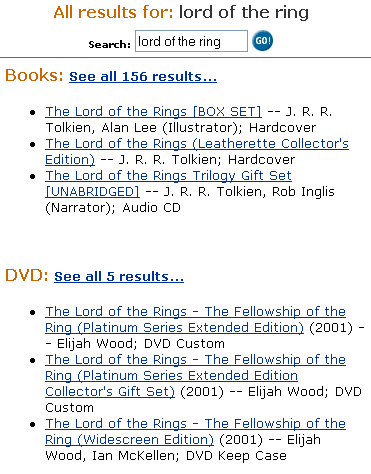
Categorizing results. If the results represent several "types" of objects, consider categorizing the results by that type. For example, when searching on Amazon, results may be books, movies, or CD's etc. If your site has an , users can select the type directly for a more focused search. If you use categorized results, you need to show the top 5 results in each category and allow users to see the whole list for that category
Special results. If your site uses and users typed in a keyword that matches a topic, you must present the corresponding topic page as a special result. It probably is more relevant than any of the other results anyway. Therefore, present such special results first and separate from the other "normal" results.
Built-up of the results page. The results page has the follow built-up:
- A header saying something like "Search Results"
- A search box that tells users what they typed in and allows them to refine it.
- A link to if it is available. Also present links to other Search related functionality such as , , ,.
- A statement about the results, how many, spelling suggestions etc
- The results, categorized if appropriate, and paged using
Consider combining this with a mechanism to collect search results. Either for or functionality.
In some cases it makes sense to filter on the search results. For example, by showing only items that have been added to the site in the last 2 weeks. Or setting the sort-order.