Rating
Martijn van Welie
The user wants rate an object she
knowledge about
In any site that deals with particular objects that are offered on the site and where
users discuss, use or buy the objects. Typically such a site is a site with consumer goods
such as cameras, movies, songs, hotels, holiday locations but also more virtual things such as
news items, code samples, tutorials, articles and so on.
In someway or another, when the site has a social aspect to it, rating may be applicable.
Typically a
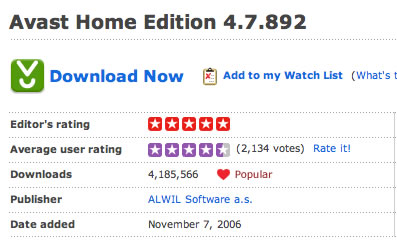
From www.download.com
Present a rating next to the product and the option to rate it
A rating is mostly placed on a fairly close
to the main product name or image. Usually it is placed below or to the right of it. There are generally 2 types of ratings that may appear:
- A rating by an editor (which cannot be modified by a user)
- A rating by the audience (any user or registered users only)
The audience rating
The rating by the audience has several important details to it that matter. First of all the number of votes that have been cast must be displayed in order to give some sense of reliability.
In addition a 'rate it' link or must be present.
The rating task
There are several subtasks here:
- Set the rating including remarks.
Usually this is done using a mouse-over effect on a set of stars or simply a classic pulldown list
- Applying the rating
Usually a click will do. With pulldown lists a click on the rate it button is required.
- Confirming and storing the rating
Sometimes a confirmation step is done where the vote can be reviewed before it is stored. When no confirm step is done it is important to provide visual feedback that the vote has been cast.
- Back to start.
A 'thank-you' and back to the product page.
Rating for registered users only
Very often it is required to before a vote can be cast. On the one hand this can be used to prevent multiple votes per person, but it also common when the site uses more extensive reviews of which the rating is simply an element.
Login issues
Issues: - multiple votes - directness of interaction - logging in - seeing the current rating
- when logged in you want to see your own rating! - explaining the scale - Combining rating
with review
 http://www.cssremix.com/
Ajax style stars
http://www.cssremix.com/
Ajax style stars
Stars using CSS
http://www.masugadesign.com/the-lab/scripts/unobtrusive-ajax-star-rating-bar/
http://www.guidetobuy.info/product6-beamers.html