Product Page
Martijn van Welie
Users need to know information about a product as part of a purchase decision or product support need.
Designing a site or a . The site is either a reseller (shop), manufacturer, opiniator (product comparisons).
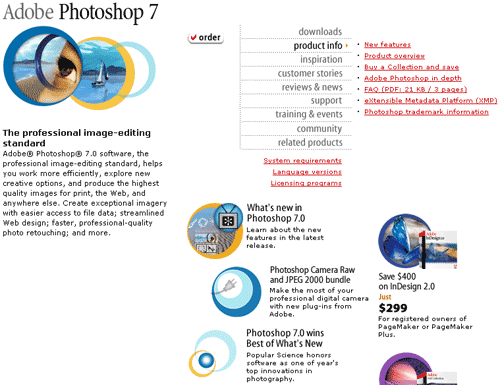
From
www.adobe.com
Show the product with categorized information sections and linking to other relevant pieces of information
Users are looking for information about a product. In some cases high-level information such a the price or picture are what they are looking for, but it can just as well be very detailed information about a particular feature. The product page shows the most general and descriptive information first and then allows users to access more detailed information.
Experiences:
- Reading about features
- Being told about the product and seeing it in action (video, 3D model, guided tour)
- Hearing opinions about the product (interviews, forum, customer testimonials)
- Getting help with using the product (manuals, faq's, updates,)
What is the product, downloads, , features, , product brochure download, preview/tryout.
The basic information of a product page consists of:
- The name of the product
- Manufacturer description
- Product options (size, colour, memory, quantity,languages)
- Image of the product (both small and large on request)
- Sample of the product, or interactive demo etc
- The price (official, discounted, offer)
- Inventory status
- Key benefits
- Short product description
- User ratings
- Testimonials
- Sales raking
- Detailed product features
- Link to product comparison
- Related product/accessories
- tell a friend link
- printable version
- list of product that other people also bought
- FAQ
- Training(materials)
- Product support
- Product forum/community
- Shopfinder
- Guided tour
- Buy/download/order link
- Hardware/system/usage requirements
It really depends whether the product page falls into a e-shop or not. When trying to sell the product a lot of the additional 'shopping' stuff is needed which you don't find on simply the manufacturer's page.
A product page is actually a 'micro-site' because it has its own navigation and can contain more than a dozen subpages per product.
A product page must inform users before buying it and help them with the product once they have it.
