Product Comparison
Martijn van Welie
The users need to compare similar products
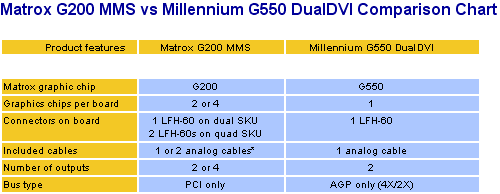
From
www.matrox.com
Shopping sites, company products, auctioning sites. The users have
arrived at a product page or they have reached a list of products. Now they need
to decide for the product or for similar products. Users may differ in what they
consider important of a product. Users must be able to easily compare individual
features of the product. Products may differ in attributes.
Show a matrix of products and features
Show the features on the rows of the matrix and the products in the
columns. If a feature is present, mark it. Otherwise don't mark it. If the
feature has specific interesting data for users, show the data instead of the
mark.
If there are many features, they can be grouped so that users can select which
aspects they want to compare. When there are many products to compare, let users
select which products they want compare. This can be done in one page when there
are not so many products, otherwise it is done in two steps.
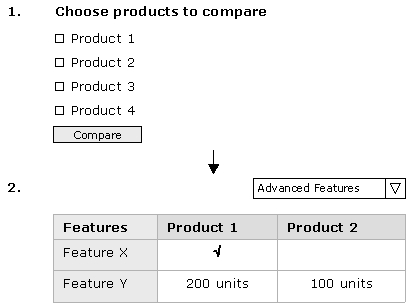
> open
wireframe <
The product/features matrix gives immediate overview and facilitates
easy comparison. By only marking available features visual clutter is minimized.
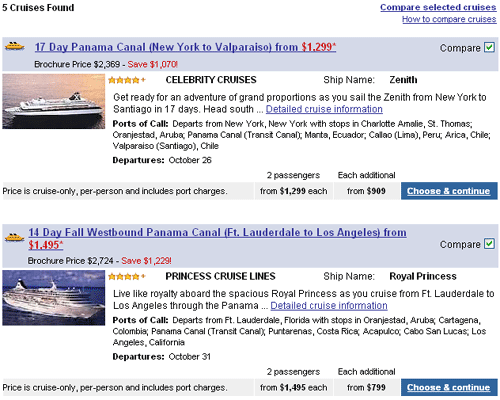
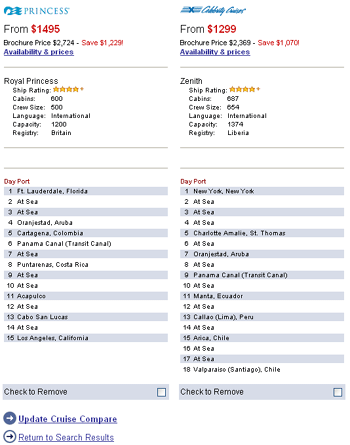
This example from www.expedia.com nicely combines a product comparison with results. A search result can be selected for comparison and by clicking the link "compare selected cruises" the comparison is show. At the comparison screen itself, users can deselect one.
An example from www.creative.com with a selector for the
aspects and models:

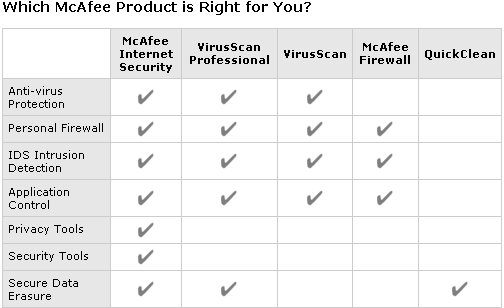
and an example from www.mcafee.com:
 www.3dblaster.com