Center Stage
Jenifer Tidwell and Martijn van Welie
Users need to know where to find the important things in relation to all the things on the page
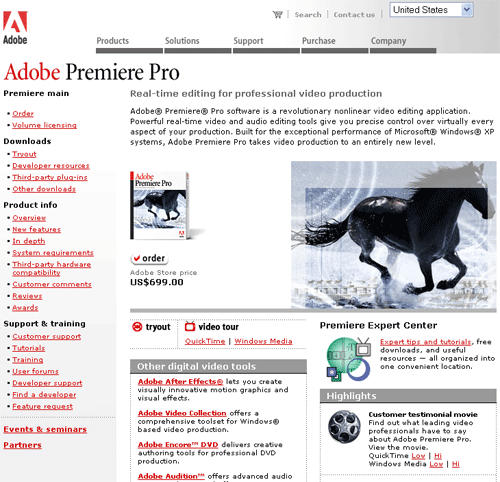
You are any particular page on a site but especially on crowded pages such as a . A web page is presenting information to the user and the users must easily be able to see what the important things are on the page and which other things are of less importance. A Center Stage gives users a primary area of focus.
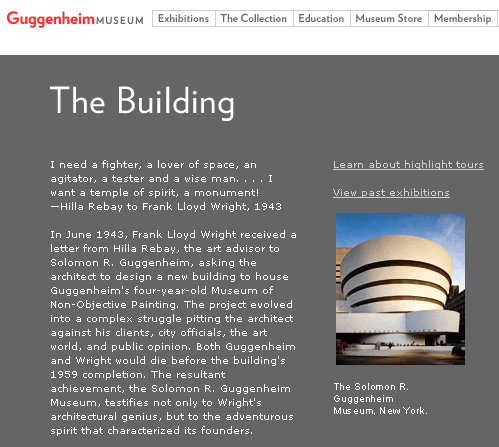
From
www.guggenheim.com
Create a large "center stage" that dominates on the page
The center stage is the place where the most important things happen. For the stage is taken by the objects that are work on. For most other site types, it will be the real content. A center stage allows users to focus on one thing in particular, the most important thing on the page. That means that the center stage is also by far the largest area of the page. Usually at least 50% of the page width is for the center stage. If your page has a multi-column layout, the center-stage is usually the middle and widest column
The center stage is usually colored with the most neutral color in the color scheme, i.e. white or a soft color. The color should contrast with other areas such a local navigation or sections with related stuff that go at the sides. A center stage is recognizable even without being able to read the screen.
Content on the center stage is usually displayed in a larger font or it has images besides the text. The Center Stage is the 'top' of the visual hierarchy of the page.
The user's eye should be guided immediately to the start of the most-important information (or task), rather than wandering over the page in confusion. An unambiguous central entity "anchors" their attention. Just as the lead sentence in a news article establishes the subject matter and purpose of the article, so the entity in center stage establishes the purpose of the UI. Once they have recognized it, they will use it as such.
Even on crowded a a Center Stage helps to give some focus on the most important information. In this case the center-stage is in the right-hand column and stops directly after the main message.