Autocomplete
Martijn van Welie
The user wants to enter a label that is part of a large set
Naturally, autocomplete is always part of a . Usually as part of a or web-based email editors. It is also often used by Airline booking pages where the destination needs to be selected. In all cases, the set of possible values and the potential values can help the user to do their task quicker.
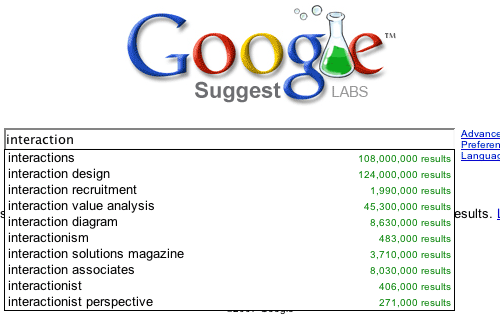
From
Google Suggest
Suggest possible label names as users are typing
As soon as the users have entered the first character, the application starts creating matches with the whole set. Those matches are then directly shown underneath the edit box. The user can select the desired value once it has been spotted by using the cursor and enter keys.
Instead of having to rely on memory entirely, autocomplete helps users to locate the desired item in less steps than would be needed to enter the entire label.
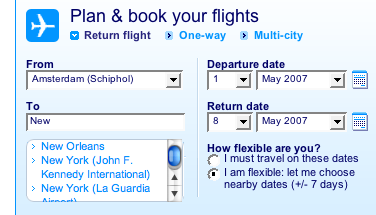
At the KLM website, autocomplete is used when having to select the destination of a flight:
 YUI: Autocomplete Control
There are various technical approaches to implement auto complete. When the set is not very large such as the case of flight destinations, the entire set can be embedded in the page code. But for very large sets such as in the Google Suggest example, server communication using AJAX is the common solution.
YUI: Autocomplete Control
There are various technical approaches to implement auto complete. When the set is not very large such as the case of flight destinations, the entire set can be embedded in the page code. But for very large sets such as in the Google Suggest example, server communication using AJAX is the common solution.